Three-way match
Automatically process invoices, purchase orders and receipts at scale. Minimize manual review and identify mismatches across your AP process at scale

Learn how Cloudsquid helps you keep your financial records accurate. Ingest your paperwork, connect your tools, and get alerts for discrepancies. Create alerts for errors, fraud and inconsistencies.
01 Overview
Connect ERP, banking, and operational data directly. Work with live records instead of exporting and reconciling CSV files.
Match records across systems, surface discrepancies, and give reviewers the evidence behind every suggested resolution.
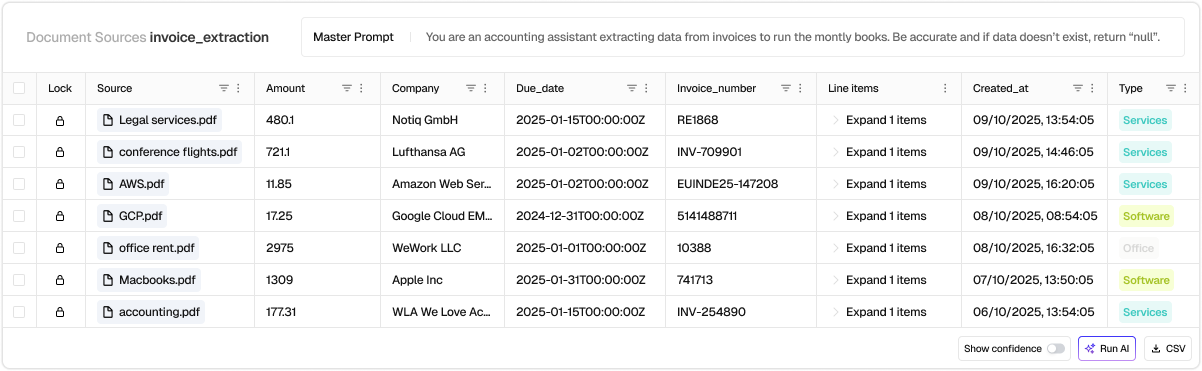
Get real-time alerts in Slack, Teams, or email when a case needs attention. Keep human approval for the hardest exceptions, with a live view of every decision and action.
Leave your work email and we will show you the workflow on your own documents.
Thank you! Your submission has been received.
Something went wrong while sending the form. Please try again or write to [email protected].
02 Use cases
Automatically process invoices, purchase orders and receipts at scale. Minimize manual review and identify mismatches across your AP process at scale
Automatically extract PDF invoices from carriers, compare charges against rats, and detect overages and errors without any manual work.
Reconcile cash balances. Ingest bank statements, reconcile transactions across accounts, and catch discrepancies earlier.
Reconcile inventory across all your systems. Spot discrepancies and trigger alerts.
When remittance details are incomplete or inconsistent, route payments into a structured exception flow with best-match suggestions - so unapplied cash doesn’t pile up at month-end.
03 Customers
“We tackled a massive document backlog of over 50,000 PDFs in minutes. After cloudsquid we verify new customers in 1 hour instead of 1 day.”
04 Automate your process
View and understand thousands of files
Manual entry and work in spreadsheets and systems
Multiple days of work and dropped files
Flexibly extract any file type, format, or edge case without custom code
Agentic workflow builder with Python nodes and native warehouse connectors
Scale real-time processing or batch jobs seamlessly
05 Where to start
Hand us a bounded evidence set: ERP export, invoices, statements, contracts. We investigate the full scoped population in an isolated environment. You get quantified, evidence-backed cases: recoverable items, exception patterns, and recurring root causes.
06 Capabilities
07 Further reading
08 Frequently asked questions
Cloudsquid has out of the box integrations with virtually any system. We offer integrations to over 2500 systems and tools. In addition we have the ability to integrate via API, Webhooks and Email - in other words: There's no limit! On top of that we have specialized AI functionality for working with PDF, Excel, Images and other unstructured data, making it very simple to automate these processes.
The best Cloudsquid use cases are recurring processes that involve complex logic and messy data coming from multiple data sources and files. For operations teams, this might be a workflow to automate data entry for order updates coming via Email. For finance, it could be an invoice audit or Purchase Order three-way matching. If it happens in spreadsheets, emails and PDFs, Cloudsquid will help.
Cloudsquid is most commonly used across operations, supply chain, finance, accounting, procurement, and data teams. But any team working with data can work faster with Cloudsquid.
Cloudsquid is purpose built for making workflow automation simple. For that reason you can simply sign up, explain in plain language what you want to automate and have results in a couple minutes. Alternatively you can just reach out to us to work together on a Proof of Concept or get an expert engineer assigned to help you out.
We support SAP, Microsoft Dynamics, NetSuite, Odoo, and QuickBooks. If you run multiple systems or entities, we can align the workflow while respecting entity-specific rules.
09 See it on your workflow
Bring one process, its real inputs, and the exceptions your team handles today.